Build Your Workflow
on HublerX
Use HublerX's no-code workflow layer to configure approvals, actions, forms, escalations, and operational logic — so your teams can run the way your business actually works without waiting on custom development.
No-code flexibility inside a connected, governed manufacturing operating system.
Most operational software breaks when the real workflow doesn't match the standard flow
Manufacturing operations don't run in one template. Approval paths, exception handling, and team handoffs vary by plant, customer, urgency, and process — and rigid software can't keep up.
Teams end up working around the system. HublerX closes that gap with a no-code workflow layer built into the operating system.
- Standard software cannot reflect actual operating processes
- Approval paths vary across plants, teams, and business cases
- Manual workarounds create weak control and poor visibility
- Custom development is too slow for operational change
- Teams need flexibility, but leadership still needs governance
- Workflow changes often break cross-functional coordination
The Standard ERP Trap
- Hard-coded logic that requires expensive consultants to change
- Linear paths that fail when real-world exceptions occur
- Data silos where critical approvals happen via email threads
The Manufacturing OS
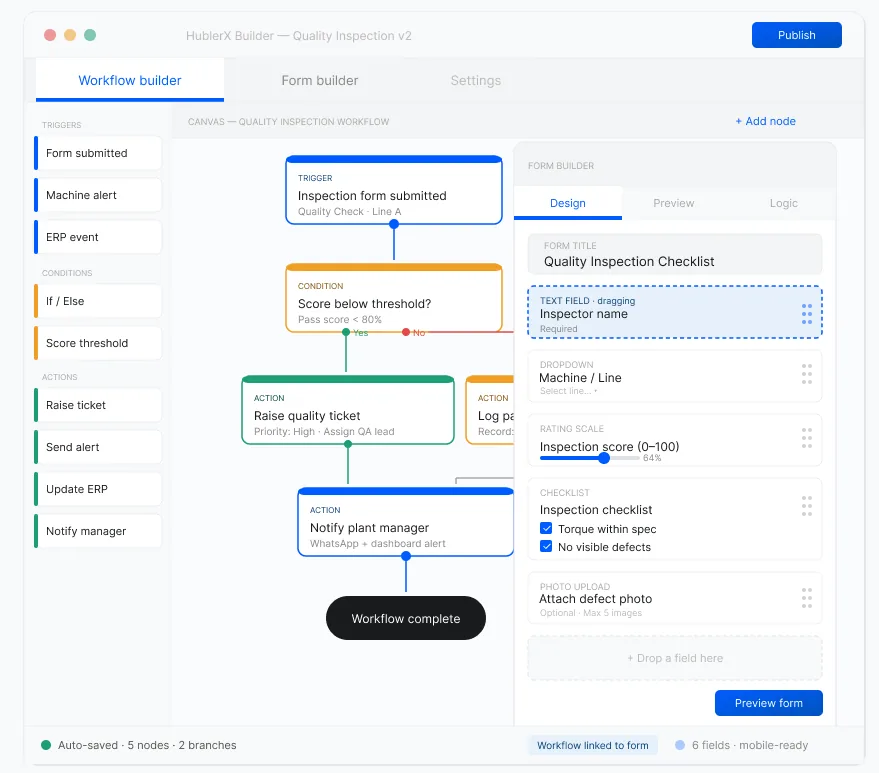
- Visual, no-code builder for instant process reconfiguration
- Dynamic branching to handle every operational "what-if"
- Native integration into a governed enterprise data model
Capabilities
Build workflows that match how your operation actually runs
HublerX gives manufacturers a no-code workflow layer for configuring how operational work moves through the business — from approvals and escalations to forms, decisions, handoffs, and control points.
Approval Workflows
Build approval chains for pricing, purchasing, quality release, dispatch exceptions, production overrides, and more.
Forms & Data Capture
Create role-specific forms for plant teams, quality teams, procurement, dispatch, and field users.
Escalation Paths
Route issues automatically based on severity, delay, customer impact, or threshold conditions.
Action Workflows
Trigger review, reallocation, procurement action, hold / release, rework, or dispatch decisions from live operating events.
Role-Based Views
Show the right tasks, actions, and fields to the right users.
Exception Handling Flows
Model what happens when things do not go to plan — not just the happy path.
Architecture
Configure operational logic without custom coding
HublerX allows teams to configure workflows directly inside the platform using a governed no-code layer. That means you can adapt processes faster while keeping them tied to real operational data, permissions, and auditability.
Workflow Design
Define stages, actions, owners, and next steps in a governed visual builder.
Rules & Conditions
Set logic based on thresholds, values, product types, plants, customers, or status changes.
Roles & Permissions
Control who can view, act, approve, escalate, or complete each step.
Data Binding
Connect workflows to live data across demand, materials, production, quality, inventory, and dispatch.
Auditability
Track who did what, when, and under what rule or condition — fully traceable.
Integration
This is not workflow automation beside operations.
It is workflow control inside operations.
What makes HublerX different is that custom workflows do not sit outside the manufacturing system. They sit inside the live operating model — and a workflow's outcome can update the rest of the platform immediately.
Operational Event
Demand change / shortage / hold / delay / exception
Workflow Trigger
Approval / escalation / review / reallocation / action path
Role-Based Action
Planner / procurement / quality / operations / dispatch / leadership
Resolved Outcome
Updated plan, release, allocation, procurement action, dispatch decision
Workflow responds to
Use Cases
Examples of workflows you can configure on HublerX
Specific implementations across the entire manufacturing lifecycle.
Commercial
- Quote approval workflow
- Promotion approval and uplift review
- Demand override approval
- Customer-priority escalation
Procurement
- RFQ and supplier approval flow
- Material shortage escalation
- Alternate supplier approval
- Urgent procurement routing
Production
- Schedule change approval
- Production exception escalation
- Plant-level allocation decision
- Work order hold / release
Quality
- Deviation escalation flow
- Non-conformance handling
- Batch hold / release approval
- Certificate completion workflow
Fulfillment
- Inventory reallocation workflow
- Dispatch exception escalation
- Delivery-risk action routing
- POD closure follow-up flow
Enterprise Value
Flexibility without losing control
Manufacturers need workflows that fit reality. But they also need governance, traceability, and standardization. HublerX helps businesses achieve both.
Adapt Faster
Change workflows without waiting on long development cycles.
Keep Governance Intact
Maintain permissions, rule logic, and approval structure across all workflows.
Reduce Manual Workarounds
Bring off-system processes back into the platform where they can be governed.
Preserve Auditability
Every step, action, and decision remains visible and traceable.
Scale Operational Consistency
Apply strong workflow logic across plants, teams, and geographies.
Technical Depth
Core no-code workflow capabilities
Workflow Design
- Multi-step workflow builder
- Configurable stages, actions, and handoffs
- Parallel and sequential step logic
- Visual workflow configuration
- Reusable workflow patterns
Rules & Logic
- Conditional routing
- Threshold-based escalation
- Logic by plant, product, customer, geography, value, or status
- Trigger-based actions
- Workflow branching and exception handling
Forms & Data Capture
- Configurable forms
- Role-specific field visibility
- Structured operational data capture
- Context-aware input screens
- Workflow-linked data entry and validation
Roles, Permissions & Governance
- Role-based access control
- Approver and action-owner mapping
- Controlled workflow editing rights
- Audit trail for changes and decisions
- Standardized governance across workflows
Platform Connectivity
- Workflows tied to live operational data
- Triggers from demand, planning, execution, quality, inventory, and dispatch
- Workflow outcomes updating the wider operating model
- Connected decision-making across teams
Impact
What a powerful no-code workflow layer changes
40%
Faster Process Adaptation
Operational teams can evolve workflows without waiting on custom builds.
60%
Lower Manual Coordination
Approvals, escalations, and follow-ups happen inside the system.
3×
Better Operational Discipline
Processes run with clearer control, ownership, and routing.
100%
Stronger Governance
Flexibility does not come at the cost of auditability or structure.
2×
Better Cross-Functional Alignment
Workflows connect teams inside one shared operating model.
30%
Higher Long-Term Platform Value
The system adapts as the business grows, changes, and becomes more complex.
Purpose-Built
Built for operational workflows, not generic apps
HublerX's no-code layer is designed for the kinds of workflows manufacturers actually need — where data, approvals, exceptions, service commitments, production constraints, and release decisions all interact.
Operational Approvals
Pricing, procurement, production, release, and dispatch logic.
Exception Handling
Real flows for shortages, delays, holds, rework, and risk.
Cross-Functional Coordination
Connect commercial, supply chain, plant, quality, and dispatch teams.
Site & Process Variability
Adapt workflows by plant, region, process type, or operating unit.
Ecosystem
Built on top of the HublerX operating system
The no-code workflow layer is strongest because it operates inside a connected manufacturing platform, not outside it.
Who It's For
Built for every role that runs operational decisions
Operations managers, IT heads, plant leaders, and finance — each gets automated workflows that match how their role actually works.
“I built 14 operational workflows in a week — without writing a single line of code.”
Build workflows in hours, not months
A drag-and-drop builder lets operations teams configure forms, approvals, and exception escalations without any IT involvement.
Standardize how exceptions get resolved
Every deviation, approval request, and escalation follows a defined path — no more ad hoc calls or inconsistent outcomes across shifts.
Cover the gaps ERP can't
Shortage escalations, quality dispositions, dispatch exceptions — operational workflows ERP doesn't support, without custom development.
Workflow Library
50+ manufacturing workflow templates — ready to deploy
Browse pre-built workflow templates across demand, procurement, shop floor, quality, and logistics. Use them as-is or configure them for your operation using the no-code builder.