
From RFQ to Quote: Automation That Eliminates Manual Data Entry
Every rekeying step is a potential error. The fix is capturing RFQ data once and reusing it everywhere.
Pillar Guide
RFQ Automation Software: The Complete Guide
Manual entry dominates most RFQ-to-quote flows. The result is predictable: slow turnaround, inconsistent costing assumptions, and avoidable rework that compounds across every request.
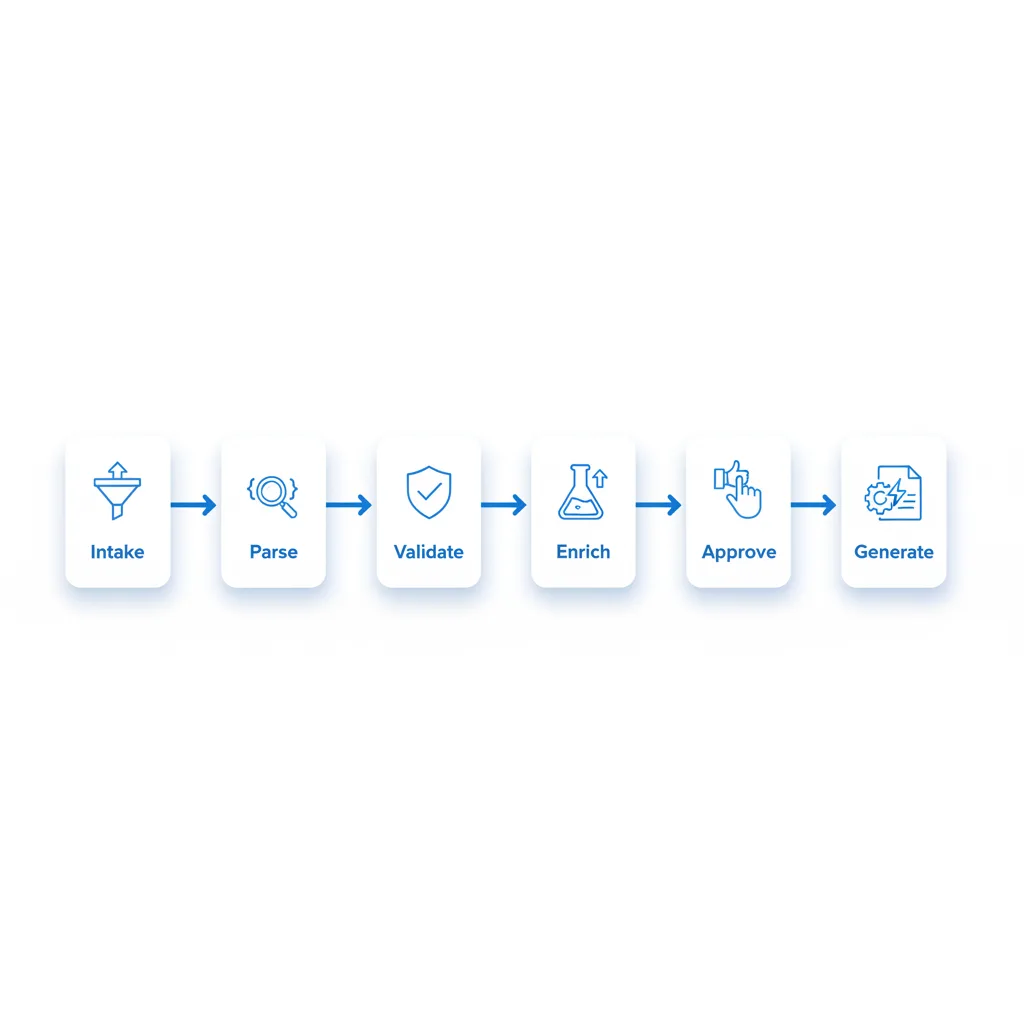
Eliminating manual data entry isn't about digitising forms. It's about designing a system that captures RFQ data once, validates it, and routes it to the right cost and capacity logic without requiring anyone to re-key the same information at a different handoff.
Where Manual Entry Hides in the RFQ-to-Quote Flow
Manual data entry shows up as small copy-paste steps distributed across teams and tools:
- RFQ intake: parsing email attachments, PDFs, customer portals, and forwarded threads
- Data normalisation: translating customer language and part numbers into internal structures
- Cost inputs: pulling labour standards, material specs, routings, and outside processing costs from various sources
- Availability checks: manually checking capacity load, lead times, and supplier constraints
- Approvals: routing margin exceptions and special pricing through email or chat
- Quote formatting: rebuilding the same commercial offer in a customer-facing template
Each touchpoint creates two risks simultaneously: cycle time expansion and data drift where the quote no longer accurately reflects what operations can execute.
Why Manual Entry Breaks Both Speed and Accuracy
It creates queue time, not just work time
When information must be retyped between systems, work cannot proceed until a specific person completes a specific step. Quotes stall: Sales cannot price without engineering input, Engineering cannot begin without a complete specification, Purchasing cannot validate availability without an accurate part definition.
It multiplies error surfaces across the process
Every rekeying step introduces a different kind of error: - Wrong drawing revision when multiple versions exist in a shared folder - Unit-of-measure mistakes.
EA versus LB, millimetres versus inches
The Automation Goal: Capture Once, Reuse Everywhere
The core design principle: capture once, reuse everywhere.
- Capture RFQ data once at intake with sufficient structure to support all downstream steps
- Validate and enrich it automatically using master data, pricing rules, and feasibility checks
- Reuse it across costing, capacity checks, approvals, and quote generation without requiring anyone to re-enter the same information
A Practical Workflow: RFQ Intake to Quote
Step 1: Intake and document parsing
A well-designed intake layer extracts structured fields into a normalised record: customer identifier, ship-to location, commercial terms, part number, drawing revision, attachments, quantity breaks, requested lead time, delivery date, Incoterms, and packaging requirements.
Output: a single structured RFQ record that all downstream steps read from.
Step 2: Data validation and completeness checks
Before engineering or costing begins, automated checks ensure the RFQ contains everything needed. When something is missing, the workflow routes a targeted, specific request — "Drawing revision not specified — please confirm current revision" — not a vague request that generates its own back-and-forth.
Step 3: Master data matching and enrichment
Automate: matching customer part numbers to internal SKUs and BOMs with confidence scoring, mapping product descriptions to standard routing templates, pulling default labour standards and scrap factors, and linking approved suppliers and current price lists.
Step 4: Costing and lead-time logic with guardrails
Automate cost calculations for material cost with yield and scrap assumptions, labour cost by operation and quantity break, outside processing, and overhead application. Add enforcement guardrails: alert when quoted margin falls below the floor, require approval workflow for non-standard terms.
Step 5: Exception-based human review
Route only what genuinely requires human judgment: ambiguous specifications, non-standard routings, unusual materials without an approved source, and capacity conflicts requiring a business decision.
Step 6: Quote generation and audit trail
Outputs: customer-facing quote with line-item detail and validity period, internal costing breakdown, assumption list documenting what the quote depends on, and complete version history.
What Changes When Manual Entry Is Removed
Faster quotes without requiring heroics: cycle time improves because intake and validation happen immediately upon receipt, teams work from a single shared RFQ record, and exceptions are routed deliberately.
Better accuracy that protects margin: the same validated data drives both the internal cost model and the customer-facing quote. Assumptions are explicit and reviewable rather than implicit and invisible.
Key Takeaways
- 1Manual entry creates queue time at every handoff — not just work time
- 2Every rekeying step multiplies error surfaces: wrong revision, wrong units, outdated costs
- 3The core principle: capture RFQ data once at intake and reuse it across all downstream steps
- 4Faster quotes and better accuracy follow when rekeying is no longer the critical path